Product
Recruitment Management System
Run hiring as a process, from requisition to offer.
Markedge's recruitment management software for teams that want vacancies, candidates, interviews and decisions tracked in one structured workflow.
Overview
Recruitment involves many people and many steps: approving a vacancy, sourcing candidates, screening, scheduling interviews, collecting feedback and making an offer. When that runs over e-mail and spreadsheets, candidates wait, feedback gets lost and nobody can see where a hire is stuck.
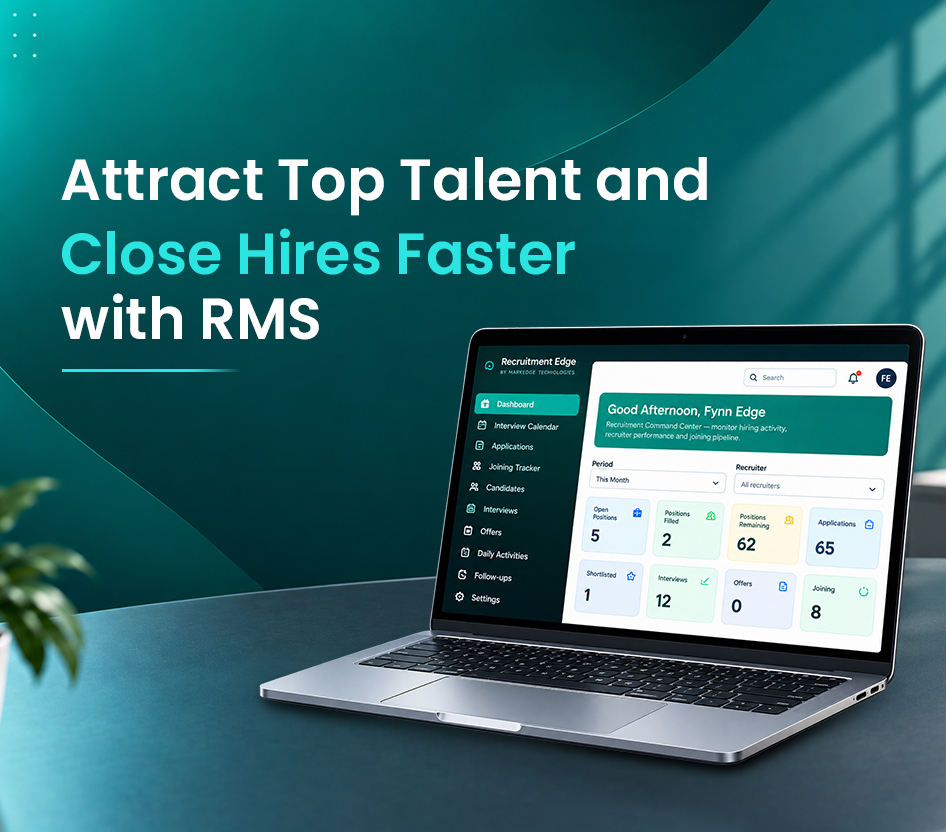
The Recruitment Management System gives HR teams, hiring managers and recruiters a shared, structured view of every vacancy and candidate. Each vacancy has a pipeline of stages you configure; each candidate has a profile, documents, interview history and feedback in one place; and reports show time in stage, pipeline health and outcomes per vacancy.
Request a demo to see the current product with your own hiring process. Module, integration and deployment details are confirmed during the demo so your evaluation reflects the product as it is today.
Modules
Vacancies and requisitions
Open a vacancy with a clear brief, approval and a hiring team.
- Requisition approval
- Hiring team per vacancy
- Job descriptions and criteria
Requisition workflow
Raise a requisition, route it for approval and open the vacancy once approved.
- Approval steps — Configurable approvers per department or grade.
- Vacancy brief — Role, location, employment type, salary band (optional) and must-have criteria in one record.
Hiring team
Assign a recruiter, hiring manager and interviewers to each vacancy with their own permissions.
- Per-vacancy roles — Interviewers see only the candidates they are scheduled to meet.
Candidate pipeline
Every applicant tracked through configurable stages with documents and history.
- Configurable stages
- Candidate profiles and documents
- Duplicate detection
Candidate profiles
Contact details, CV and documents, source, notes and the full history of every application.
- Document storage — CVs, portfolios and certificates attached to the candidate.
- Source tracking — Know whether a candidate came from a job board, referral, agency or your careers page.
- Duplicate detection — Repeat applications are linked to the existing profile.
Stage pipeline
Applied, Screening, Interview, Assessment, Offer, Hired and Rejected by default; stages and moves are configuration.
- Kanban board per vacancy — Drag-free stage moves with a reason for rejections.
- Bulk actions — Move, reject or message many candidates at once.
Interviews and feedback
Schedule interviews, collect structured feedback and decide with the whole panel.
- Interview scheduling
- Scorecards
- Panel decisions
Scheduling
Plan interview rounds, assign interviewers and record the mode (in person, phone or video).
- Interview rounds — Multiple rounds per candidate with their own panel.
- Reminders — Interviewers are reminded of upcoming interviews and pending feedback.
Structured feedback
Scorecards with the criteria from the vacancy brief, so feedback is comparable across candidates.
- Configurable scorecards — Criteria, scales and a recommendation per interviewer.
- Feedback deadlines — Pending feedback is visible on the vacancy dashboard.
Offers and handover
From approved offer to a clean handover for onboarding.
- Offer approval
- Offer status tracking
- Onboarding handover checklist
Offer management
Draft an offer, route it for approval and track acceptance or decline with reasons.
- Offer approvals — Approvers by grade or department, recorded on the candidate.
- Decline reasons — Understand why offers are refused.
Handover checklist
Once accepted, a checklist captures the documents and details onboarding needs.
- Configurable checklist — Items per location or employment type.
Reporting
Pipeline, time in stage and outcomes per vacancy, recruiter and source.
- Vacancy dashboards
- Time-in-stage reports
- Audited exports
Vacancy and pipeline reports
Candidates by stage, ageing, pending feedback and offers per vacancy.
- Time in stage — See where candidates wait longest.
- Source effectiveness — Applications, interviews and hires by source.
Exports
Permission-controlled exports, each recorded in the activity log.
- Filtered exports — Export the candidates or vacancies you have filtered.
Benefits
Every candidate accounted for
Status, stage and history visible for each applicant and vacancy.
Coordinated hiring
HR, hiring managers and recruiters work from the same record.
Process reporting
Time in stage, pipeline and outcomes reported per vacancy.
Use cases
HR teams managing several open vacancies
Keep candidates moving with visible stages and owners.
Recruitment agencies
Track candidates across client vacancies with a consistent process.
Growing companies formalising hiring
Replace ad-hoc e-mail hiring with a repeatable workflow.
Deployment options
- Cloud hosted by Markedge
- Markedge operates the platform for you, including updates. Hosting region and service terms are agreed in your proposal.
- Hosted on your infrastructure
- Deployable on a server or cloud account you own, with Markedge providing installation and support under an AMC.
Security
- Role-based access
- Recruiters, hiring managers and interviewers see only the vacancies and candidates their role allows.
- Activity trail
- Stage moves, feedback, offers and exports are recorded with the user and time.
- Encrypted connections
- The application is served over HTTPS; browser sessions use secure, HttpOnly cookies.
- Candidate data controls
- Candidate records can be exported or removed on request, and retention periods are configurable.
Frequently asked questions
HR teams, hiring managers and recruitment agencies that need vacancies and candidates managed in one structured workflow.
Hiring stages and their configuration are covered in the demo, where we map your current process to the product.
Request a demo; we walk through the product with your process and answer implementation questions.
Related services
Custom Business Applications
Internal applications for operations, approvals, records and reporting, built around your workflow and connected to the systems you already...
AI & Automation
Workflow automation, document processing and assisted decision-making designed around measurable business tasks rather than technology for i...
Book a demo of Recruitment Management System
Choose the product and tell us about your team. We will walk through the product with your scenarios.